
EV Charging Guide
What Does the Kempower Electric Car Charger Screen Mean?
Updated April 2026
The Kempower charger is showing a graph and a bunch of numbers, and you have no idea what any of it means. Kempower electric car chargers display more information than most other chargers, including a real-time charging curve graph. This is actually useful once you understand it. This guide explains what every number, graph, and status message means on a Kempower screen.
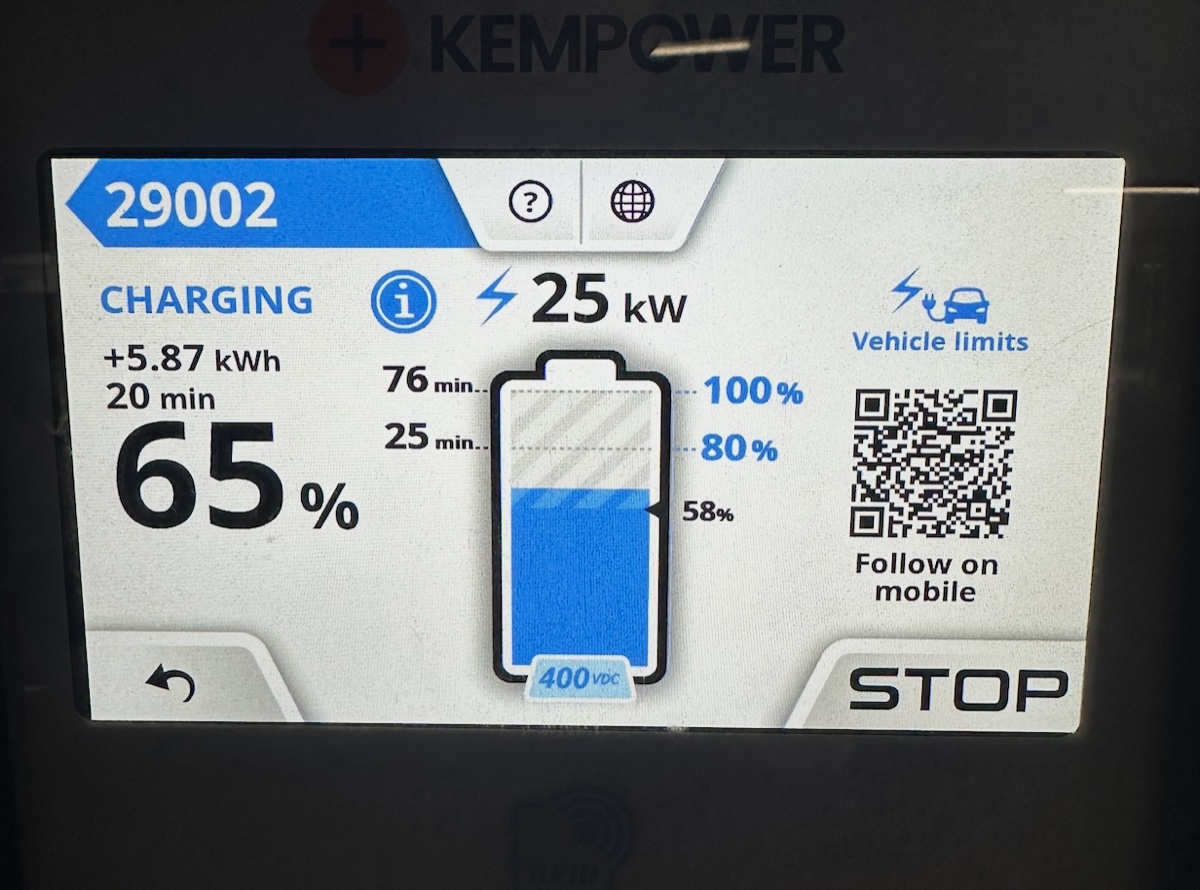
Screen layouts may vary depending on the Kempower firmware version and the charging network operating the station. Information is approximate and based on publicly available documentation. Always follow the instructions displayed on the charger and check your vehicle's manual. EVcourse is not affiliated with Kempower or any charging network.
Quick Fix
- Number on the left (kW)? That is how fast your car is charging right now. Higher is faster.
- Graph going down? Normal. Charging slows as the battery fills up. This protects the battery.
- "Station is limiting power"? Another car is sharing the same power unit. Your speed may increase when they finish.
What the Kempower Screen Layout Means
The screen is divided into four areas, each showing different information about your session.
Top center: Battery percentage (SoC%)
Displayed in large numbers. This is your battery's current state of charge, sent from your car to the charger via the CCS communication link.
Center left: Charging power (kW)
How fast your car is charging right now. This number changes constantly. A higher number means faster charging. It will drop as the battery fills up.
Center right: Energy and cost
Shows the total kWh delivered so far and the current session cost. Useful for tracking how much you are spending.
Bottom: Real-time charging curve graph
This is the graph that confuses most people. It shows how your charging power changes over time. See the next section for a full explanation.
The Charging Curve Graph: What It Shows and Why It Drops
The graph shows power (kW) on the vertical axis and time on the horizontal axis. The line represents how much power your car is requesting from the charger at each moment.
At the start of the session, the line is usually high, meaning your car is charging at its maximum speed. As the battery fills up, the line gradually drops. This is completely normal and happens with every electric car.
The drop typically starts somewhere between 50% and 80% state of charge, depending on your car's battery management system. The battery management system reduces the charging speed to protect the battery cells from overheating and degradation.
This is your car's decision, not the charger's. The charger can deliver more power, but the car is asking for less. If you see "Vehicle is limiting power" on the screen, this confirms it.
Power Sharing: Why Your Speed Might Be Lower Than Expected
Kempower uses a central Power Unit connected to multiple Satellite dispensers. The total power is shared between all cars currently charging.
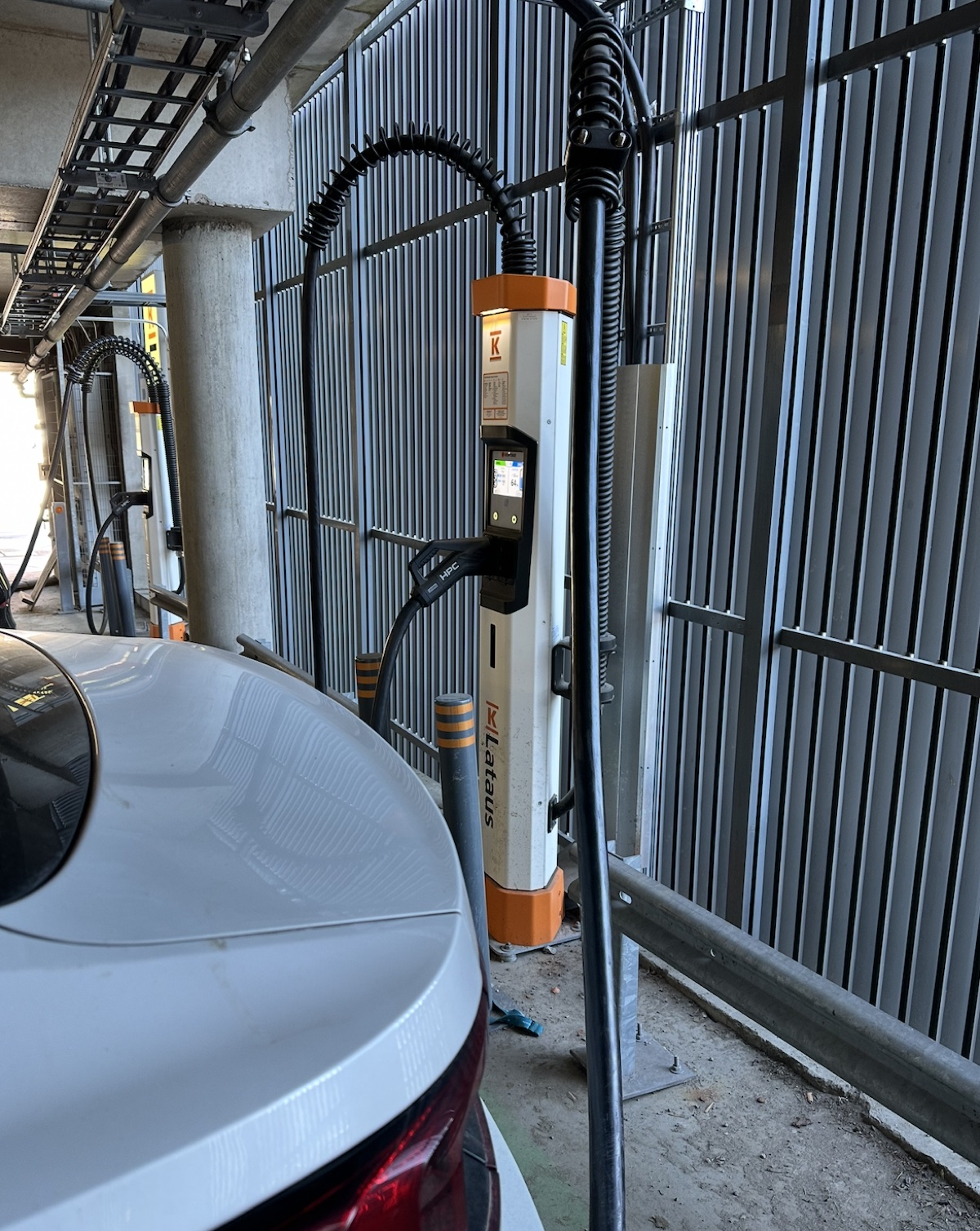
- → Dynamic allocation: Power is distributed in approximately 25 kW increments based on what each car is requesting.
- → "Station is limiting power": The Power Unit is at capacity. Another car is using the shared power. Your speed may increase when they finish or disconnect.
- → First-come, first-served: The first car to connect generally gets its requested power first. Remaining capacity is distributed to the next car.
Status Messages and What They Mean
"Vehicle is limiting power"
Your car's battery management system is requesting less power than the charger can deliver. This is normal and happens because of battery temperature, high state of charge, or your car's built-in charging curve. Not a charger fault.
Short video filmed at a Kempower charger: scanning the "Vehicle is limiting power" message with the EVcourse app to see what it actually means.
"Station is limiting power"
The Power Unit is shared between multiple cars or has a grid power constraint. Your speed may increase when other cars finish. Not a fault, just shared infrastructure.
"Connector locked"
The mechanical lock is engaged. This confirms the connector is securely attached. Charging is about to start or is in progress.
"Plug in to start"
The Satellite is idle and available. Plug in your car to begin.
If the screen shows a message not listed here, scan it with the EVcourse app for an instant explanation.
LED Indicators on Kempower Satellites
- → Green: Available. Ready for a new session.
- → Blue: Charging in progress.
- → Flashing blue: Authorized and waiting for the car to connect.
- → Red: Out of order or error. Try a different Satellite.
How to Start a Charging Session on Kempower
- → QR code (typical): Scan the QR code on the Satellite screen. A browser page opens for payment via Apple Pay, Google Pay, or card entry. Once payment is confirmed, plug in.
- → RFID: Tap your charging card on the small reader below the screen. Wait for authorization, then plug in.
- → Plug&Charge: Available on newer Kempower units if the network has enabled it. Just plug in and the car handles authentication automatically.
From Finn, engineer: Kempower screens can look overwhelming, but they actually show you more useful data than most other chargers. The charging curve graph tells you exactly how your session is going. If the curve drops sharply, that is your car managing the battery, not a charger fault. Drivers tell us this is one of the most confusing things they see at a public charger.
EVcourse uses expert knowledge to translate charger screens and decode error codes instantly. Scan any display for help, free to start on iOS.
Frequently Asked Questions
What does the charging curve graph on a Kempower screen mean?
The graph shows your charging power (kW) over time. The line represents how much power your car is receiving from the charger. It typically starts high and gradually drops as the battery fills up. This is normal. The drop usually begins around 50% to 80% state of charge, depending on your car's battery management system.
What does 'Vehicle is limiting power' mean on a Kempower charger?
This means your car's battery management system is requesting less power than the charger can deliver. This is normal and usually happens because of battery temperature, high state of charge, or the car's built-in charging curve. It is not a problem with the charger.
What does 'Station is limiting power' mean on a Kempower charger?
This means the Kempower Power Unit is distributing power between multiple connected cars or has a grid power constraint. Kempower uses dynamic power sharing in 25 kW increments. Your charging speed may increase when other cars finish or disconnect.
Which charging networks use Kempower chargers?
Major European networks using Kempower hardware include Recharge (Nordics), Osprey (UK), Fastned (selected sites), and Vattenfall (Northern Europe). The charger hardware is the same, but payment methods and pricing depend on the network operating the station.
Watch: Kempower Screen Walkthrough
A short walkthrough of a live Kempower charger screen, number by number.
Not sure what the screen means?
Point your phone at the Kempower screen. The EVcourse app reads charger screens and explains what every number means for your specific car.
Don't understand the screen? Scan it.
Point your phone at any charger or car screen for instant help. Any brand, any language. Free to try on iOS.
Free to try on iOS. Android coming soon. Join the Android waitlist.